Actions and Stuff FAQ
Getting the pack installed, but animations not showing? Not sure whether to download APK or MCPACK? Wondering if achievements still work? These are the most common questions players have after discovering Actions and Stuff, the free Minecraft Bedrock animation resource pack by Oreville Studios. This FAQ covers download options, APK vs MCPACK differences, installation problems, Realms and server compatibility, achievements, performance, and troubleshooting for all platforms. Use the categories below to jump straight to your answer.
Cannot find your answer? Contact us through our contact page.
Free for Android & PC
General Questions
What is Actions and Stuff?
Actions and Stuff is a resource pack for Minecraft Bedrock Edition. It enhances the game with realistic animations for players, mobs, and environmental effects. The pack changes only visual elements while keeping all gameplay mechanics unchanged.
Who created Actions and Stuff?
Oreville Studios created and maintains Actions and Stuff. They are a verified Minecraft Marketplace partner.
Is Actions and Stuff official?
Actions and Stuff is not made by Mojang or Microsoft. It is created by Oreville Studios, an independent creator. The Marketplace version is officially approved and verified by Mojang.
What does Actions and Stuff change?
The pack changes:
- Player animations (walking, running, swimming, eating)
- Combat animations (sword swings, bow draws, shield blocks)
- Mob behaviors (cows graze, wolves wag tails, chickens peck)
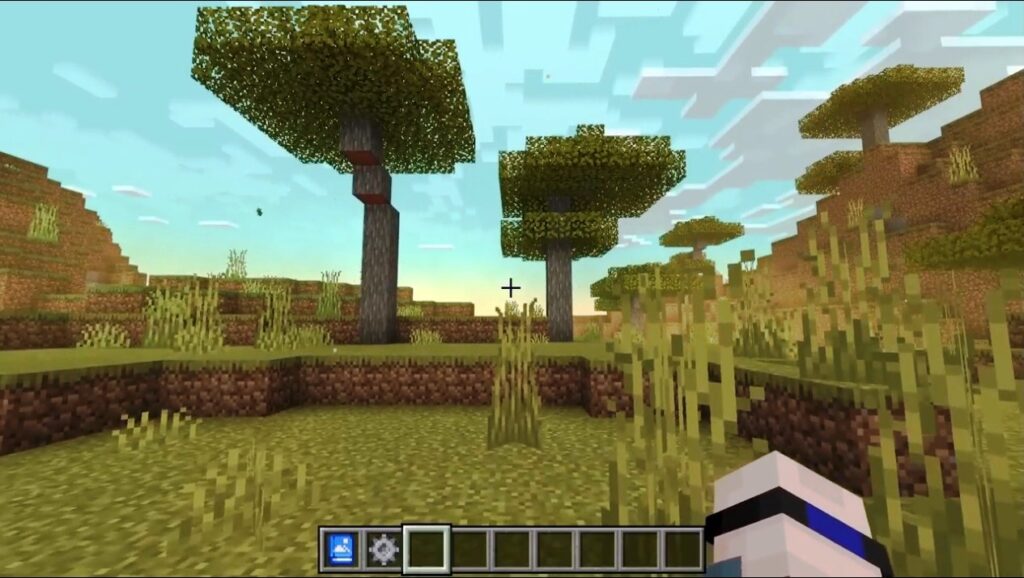
- Environmental effects (grass sways, rain splashes, torches flicker)
What does Actions and Stuff NOT change?
The pack does NOT change:
- Crafting recipes
- Mob difficulty or AI
- Block properties
- Game mechanics
- World generation
- Item stats
Is Actions and Stuff safe to download?
Yes. All files on our website are verified and safe. We scan all uploads for malware. The Marketplace version is verified by Mojang.
How popular is Actions and Stuff?
Actions and Stuff is one of the most downloaded animation packs for Bedrock Edition, with millions of downloads worldwide.
Download Questions
Is Actions and Stuff free?
Yes and no. It depends on your platform:
| Platform | Price |
| Android (APK) | Free |
| Android (MCPACK) | Free |
| Windows PC (MCPACK) | Free |
| iOS | 1690 Minecoins ($9.99) |
| Xbox | 1690 Minecoins ($9.99) |
| PlayStation | 1690 Minecoins ($9.99) |
| Nintendo Switch | 1690 Minecoins ($9.99) |
Where can I download Actions and Stuff?
Download from our official download page. Choose your platform for the correct file.
What is the difference between APK and MCPACK?
| Feature | APK | MCPACK |
| Contains | Minecraft + Pack | Pack only |
| File Size | 247.53 MB | 18.43 MB |
| Platform | Android only | All Bedrock |
| Setup | Easiest | Manual import |
| Best For | New users | Existing Minecraft owners |
Which download should I choose?
- Android user without Minecraft: Download APK
- Android user with Minecraft: Download APK or MCPACK
- PC user: Download MCPACK
- iOS user: Use Marketplace
- Console user: Use Marketplace
How big is the download?
| File | Size |
| APK | 247.53 MB |
| MCPACK | 18.43 MB |
| Marketplace | 20 MB |
Can I download on mobile data?
Yes, but WiFi is recommended due to the file size. The APK is 247 MB, which may use significant mobile data.
Why is the APK file so large?
The APK includes the complete Minecraft Bedrock Edition plus the resource pack. MCPACK is smaller because it contains only the resource pack.
All Platforms Available
Installation Questions
How do I install Actions and Stuff?
Installation depends on your platform:
Android APK:
1. Download APK
2. Enable Unknown Sources
3. Install APK
4. Open and play
MCPACK (All Platforms):
1. Download MCPACK
2. Tap/double-click file
3. Minecraft imports automatically
4. Activate in Global Resources
Marketplace (iOS/Console):
1. Buy Minecoins
2. Purchase a pack in the Marketplace.
3. Activate in Global Resources
What is Unknown Sources?
Unknown Sources is an Android security setting. It allows installation of apps from outside the Play Store. You must enable it to install the APK.
How do I enable Unknown Sources?
Android 8.0+: Settings > Apps > Special Access > Install Unknown Apps > Browser > Allow
Android 7.0 and below: Settings > Security > Unknown Sources > Enable
Why does the MCPACK not open Minecraft?
Possible reasons:
1. Minecraft is not installed
2. Wrong Minecraft version (Java instead of Bedrock)
3. File association broken
Fix: Open Minecraft first, then go to Settings > Storage > Import and select the file manually.
Where does MCPACK get imported?
MCPACK files are imported to Minecraft’s resource_packs folder automatically. You do not need to know the location.
How do I activate the pack?
1. Open Minecraft
2. Go to Settings
3. Select Global Resources
4. Find Actions and Stuff in Available
5. Tap/click to move to Active
What is Global Resources?
Global Resources applies resource packs to ALL worlds automatically. It is the recommended way to use Actions and Stuff.
Can I install on multiple devices?
APK/MCPACK: Yes, download and install on as many devices as you want.
Marketplace: Yes, purchase links to your Microsoft/Xbox account. Sign in on any device to access.
Step-by-Step Instructions
Features Questions
What animations are included?
Player Animations:
- Walking, running, sneaking
- Swimming, jumping, falling
- Eating, drinking
- Combat attacks
- Idle emotes
Mob Animations:
- Cows grazing
- Chickens pecking
- Wolves wagging tails
- Zombies shambling
- Skeletons aiming
- 30+ mobs total
Environmental:
- Grass swaying
- Leaves rustling
- Water ripples
- Rain splashes
- Torch flickering
Does it include all mobs?
Most common mobs have enhanced animations. Some rare or newer mobs may use default animations until future updates.
What are the resolution options?
Three options are available:
| Mode | Quality | Best For |
| 16x | Highest | Powerful devices |
| 32x | Balanced | Most devices |
| 64x | Performance | Older devices |
How do I change the resolution?
1. Settings > Global Resources
2. Find Actions and Stuff in Active
3. Tap gear icon
4. Select new resolution
5. Changes apply immediately
Are there first-person animations?
Yes. Version 1.9+ includes improved first-person animations for arms and hands during combat and tool use.
Does it change textures?
The pack focuses on animations. Textures remain close to vanilla Minecraft. You can use texture packs alongside Actions and Stuff.
Are there sound changes?
No. Actions and stuff change only visual animations. All sounds remain vanilla.
Every Animation Explained
Compatibility Questions
Does Actions and Stuff work on Java Edition?
No. Actions and stuff are for Bedrock Edition only. Java Edition uses different file formats and animation systems.
For Java Edition, try these alternatives:
- Fresh Animations
- Mo Bends
- Emotecraft
Which Minecraft versions are supported?
| Version Range | Supported |
| 1.16.x | Yes |
| 1.17.x | Yes |
| 1.18.x | Yes |
| 1.19.x | Yes |
| 1.20.x | Yes |
| 1.21.x | Yes |
Does it work with other resource packs?
Yes, with most packs. Compatible with texture packs like Faithful.
Not compatible with other animation packs. Only use one animation pack at a time.
Does it work with shaders?
Yes, most shaders work alongside Actions and Stuff. Heavy shaders may reduce performance on mobile.
Does it work with behavior packs?
Yes, unless the behavior pack modifies the same entities. Most behavior packs are compatible.
Does it disable achievements?
No. Actions and Stuff is a resource pack, not a mod or behavior pack. All achievements remain enabled.
Can I use it on Realms?
Yes. Two options:
1. Personal: Enable in your Global Resources. Only you see animations.
2. Realm-wide: The owner adds to the Realm settings. Everyone sees animations.
Does it work on servers?
Yes. Works on all Bedrock servers, including
- The Hive
- CubeCraft
- Mineplex
- Lifeboat
- Custom servers
Other players do not need the pack. Only you see the animations.
Performance Questions
Will it slow down my device?
Most modern devices handle it well. Older devices may experience some slowdown.
Use 64x resolution mode if you notice lag.
Which resolution should I use?
| Device Type | Recommended |
| Flagship phones (2022+) | 16x |
| Mid-range phones (2020+) | 32x |
| Budget/older phones | 64x |
| Gaming PC | 16x |
| Average PC | 32x |
| PS5, Xbox Series X | 16x |
| PS4, Xbox One | 32x or 64x |
| Switch Handheld | 64x |
| Switch Docked | 32x |
How do I improve performance?
1. Use 64x resolution mode
2. Lower render distance (8-12 chunks)
3. Set graphics to Fast
4. Turn off smooth lighting
5. Close background apps
6. Disable other resource packs
Does it drain the battery faster?
Slightly more than vanilla Minecraft due to enhanced animations. Use 64x mode for better battery life.
Does it cause overheating?
On some older devices, extended play may cause warming. Remove the phone case and take breaks if the device gets hot.
What are the minimum requirements?
| Requirement | Minimum |
| Android | 5.0+ |
| iOS | 12+ |
| RAM | 2 GB |
| Storage | 500 MB free |
Multiplayer Questions
Do other players see my animations?
No. Animations display only on your device. Other players see default Minecraft animations unless they also have the pack.
Do I need to install on the server?
No. Resource packs work client-side. You install it on your device only.
Does it work in cross-play?
Yes. You see animations when playing with any platform (Xbox, PlayStation, Switch, PC, Mobile).
Can I use it on Realms?
Yes. Enable in Global Resources for personal use. Or the Realm owner can add to the Realm settings for everyone.
Is it allowed on servers?
Yes. Resource packs are allowed on all Bedrock servers. They provide visual changes only and do not give unfair advantages.
Will I get banned for using it?
No. Resource packs do not violate server rules. They only change what you see on your screen.
Troubleshooting Questions
Animations not showing after install?
Check these:
1. Pack must be in the Active section (not Available)
2. The pack should be at the top of the Active list
3. Disable conflicting resource packs
4. Restart Minecraft completely
5. Verify Minecraft version is 1.16+
MCPACK won’t import?
Try these:
1. Ensure Minecraft Bedrock is installed (not Java)
2. Restart your device
3. Open Minecraft first, then import via Settings > Storage
4. Redownload the file (may be corrupted)
The pack disappeared after the update?
Solution:
1. Go to Global Resources
2. Check the Available section
3. Reactivate if found
4. If not found, reimport MCPACK or redownload from Marketplace (My Content)
Game crashes with pack enabled?
Try:
1. Switch to 64x resolution
2. Lower render distance
3. Disable other packs
4. Clear Minecraft cache 5. Reinstall Minecraft
APK installation failed?
Check:
1. Unknown Sources is enabled
2. Enough storage space (500 MB+)
3. File downloaded completely
4. No corrupted download (redownload)
“Parse Error” when installing APK?
Causes:
1. Incomplete download (redownload)
2. Android version too old (need 5.0+)
3. Corrupted file (download again)
How to uninstall?
APK: Settings > Apps > Minecraft > Uninstall
MCPACK: Settings > Global Resources > Deactivate pack > Storage > Delete pack
Update Questions
How often is Actions and Stuff updated?
Major updates every 2-3 months. Compatibility patches are released after Minecraft updates.
How do I update the pack?
APK Users:
1. Download the new APK from our site
2. Install over existing (no uninstall needed)
3. Worlds and settings preserved
MCPACK Users:
1. Download new MCPACK
2. Import the file
3. Deactivate old version
4. Activate the new version
Marketplace Users:
1. Updates may download automatically
2. Or check Marketplace > My Content
Will I lose my worlds when updating?
No. Your worlds are stored separately. Updates do not affect world data.
What’s new in version 2.0?
- Enhanced weather particles
- New idle emotes
- 40% smaller file size
- Better performance
- Multiple bug fixes
Where can I see changelog?
Visit our info page for the complete version history.
Payment and Pricing Questions
Why is iOS/Console not free?
Apple, Microsoft, Sony, and Nintendo do not allow external file downloads. The only option is the Minecraft Marketplace, which requires Minecoins.
How much do Minecoins cost?
| Package | Price |
| 320 Minecoins | $1.99 |
| 660 Minecoins | $3.99 |
| 1020 Minecoins | $5.99 |
| 1720 Minecoins | $9.99 |
Actions and Stuff cost 1690 Minecoins. Buy the 1720 package ($9.99).
Is it a one-time purchase?
Yes. Buy once and keep forever. All updates are free. No subscription.
Can I get a refund?
Marketplace purchases follow platform refund policies:
- iOS: Contact Apple Support
- Xbox: Contact Microsoft Support
- PlayStation: Contact Sony Support
- Nintendo: Contact Nintendo Support
Can I share my purchase?
APK/MCPACK: Yes, feel free to share.
Marketplace: Purchase links to your account. Others need their own purchase.
Is there a free trial?
No official trial. Watch YouTube videos to see the pack in action before buying.
Marketplace Purchase Help
Still Have Questions
Could not find your answer? Here are more resources:
| Resource | Description | Link |
| Setup Guide | Installation help | Setup Guide |
| Complete Guide | All features explained | Complete Guide |
| Info Page | Technical details | Info Page |
| Contact | Direct support | Contact Page |
Android | 247.53 MB | Easiest Option All Bedrock | 18.43 MB | Free iOS, PC, Xbox, PlayStation, Switch